










![How to Start an Ecommerce Business in Australia [2023 Guide]](/template/e27cf56f/images/resource-blog-right-img1.png)



Ecommerce Website Development: A Complete Step-By-Step Guide
Today, global internet access is in a continuous surge. It is now connecting nearly six billion users worldwide while turning online shopping into a dominant force in modern consumer behaviour. In 2025, global retail ecommerce sales were projected to exceed USD 3.6 trillion, and this figure is going to rise sharply in 2026 as well.
Think about how frequently you use ecommerce in your daily life, from ordering groceries online instead of going to the store to buying clothes from your phone while commuting, or comparing prices on multiple websites before making a purchase. This is no longer just used to be an occasional convenience, but has become a normal part of how people shop.
And this change in behaviour means an ecommerce website is no longer optional for businesses. Customers want the online stores to be fast, easy to use, and trustworthy.
This step-by-step guide to ecommerce website development explains how to build an online store that matches all these expectations.
What is ecommerce website development?
Ecommerce website development is a process of building an online store that allows a business to sell products or services over the internet.
In simple terms, it is the process of creating a website that allows customers to:
- Browse products or services
- Add items to a cart
- Make secure online payments
- Receive order confirmations and support
If we see from a business perspective, ecommerce website development goes beyond just building pages. It also involves choosing the right ecommerce platform, designing a user-friendly layout, ensuring fast loading speeds, managing products and inventory, and optimising the site so customers can easily find it through search engines.
Some core components of an ecommerce website
If your target is to build an online store that performs well, you need to understand the core components of an ecommerce website. Below is the list of the elements every successful ecommerce website needs to have.
1. User-friendly website design
A user-friendly ecommerce website design makes sure that the navigation is easier, it has clear menus, and there is a mobile-responsive layout. It improves engagement, trust, and conversion rates as users can browse products on any device.
2. Detailed product catalogue
The product catalogue needs to display all products with high-quality images, detailed descriptions, pricing, variations, and availability. Well-optimised product pages will help customers make purchase decisions without doubt.
3. Shopping cart functionality
Allows customers to add, remove, or update products even before checkout, as well as shows product totals, taxes, and shipping costs.
4. Secure checkout
A secure checkout process is required to reduce cart abandonment. If you can introduce features like guest checkout, minimal form fields, and a clear order summary, it will help customers to complete purchases quickly and safely.
5. Payment gateway integration
It will enable secure online payments through credit or debit cards, digital wallets, bank transfers or any local payment methods. If you offer multiple payment options, it will boost trust as well as improve conversion rates.
6. User accounts and authentication
User accounts allow customers to sign up, log in securely, track orders, save addresses, and view order history. This improves user experience and encourages repeat purchases.
7. Order management
With an efficient order processing system, a store owner can handle everything smoothly, from managing orders to updating order statuses to handling returns and issuing refunds.
8. Inventory management
From tracking stock levels, product updates, categories, and pricing to preventing overselling, it helps in improving product availability.
9. Security and data protection
This is an important factor in ecommerce website development. SSL certificates, encrypted transactions, secure authentication, and fraud protection are all needed to secure customer data as well as to build trust.
10. Product filtering
Advanced search and filtering options let users quickly find products using keywords, categories, filters, and sorting tools. This improves usability and keeps customers engaged.
11. Website performance optimisation
Performance optimisation ensures fast page loading times across devices. A fast ecommerce website improves user experience, reduces bounce rates, and supports higher search engine rankings.
Types of ecommerce websites
Ecommerce websites can be grouped based on who is selling and who is buying. Understanding these types helps businesses choose the right model and features for their online store. Four of the most common types of ecommerce websites are,
1. Business to Customer
This is the most widely recognised business model. In this model, businesses sell products or services directly to individual customers. The Global B2C ecommerce market is projected to grow at a CAGR of around 11.5% during the forecast period, 2024-30.
2. Business to Business
Just as the name says, B2B ecommerce involves transactions between two businesses. It can be between wholesalers and retailers or manufacturers and wholesalers. This is another common type of ecommerce website.
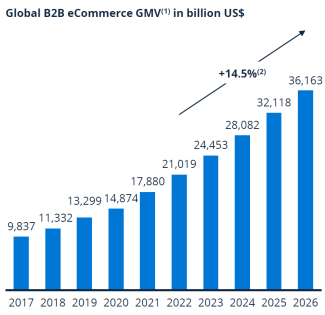
According to the International Trade Administration, the global B2B ecommerce market is expected to grow at a 14.5% compound annual growth rate through 2026.
3. Consumer to Consumer
In C2C ecommerce settings, an individual can directly buy or sell products or services from another individual. Here, the business doesn’t hold any direct involvement, and the platform works as a marketplace. We can see Amazon or eBay listings as an example.
4. Consumer to Business
In this model, an individual offers products or services to a business. Freelance workplace and stock photography websites are some of the great examples.
Options for building an ecommerce website
If we consider budget, technical skills, and business goals, there are several ways to build an ecommerce website, and each of them comes with its own advantages and limitations.
1. Hosted ecommerce platforms (SaaS)
Hosted ecommerce platforms work as a software-as-a-service solution. In this platform, everything from hosting and security to updates and maintenance is handled for you. These platforms are mostly easy to set up and ideal for businesses that want to launch quickly with no technical complexity.
Best for: Performs best for small to medium businesses that look for speed and simplicity.
2. Open-source ecommerce platforms
With open-source platforms, you will get full access to the source code, allowing complete customisation of your ecommerce website. While they offer flexibility and control, you will need technical expertise for setup, hosting, security, and ongoing maintenance.
Best for: Businesses that need custom features and have access to development resources.
3. Website builders with ecommerce features
Most of the website builders offer drag-and-drop tools and come with built-in ecommerce functionality. As they are beginner-friendly, they are considered suitable for small stores or businesses that sell a limited number of products. However, they may have limitations as the store grows.
Best for: Startups, personal brands, and small online stores.
4. All-in-one managed ecommerce platforms
All-in-one managed ecommerce platforms combine everything from website building to hosting to payments to inventory to order management into a single solution. Everything is managed from one dashboard. So, there is no need for multiple tools or integrations. These platforms simplify operations but may offer less customisation compared to open-source or custom builds.
Best for: Works best for businesses that want a complete, low-maintenance ecommerce solution.
5. Custom ecommerce website development
Custom ecommerce development is about building a website from the ground up. Tailored to your exact business needs. This option comes with maximum flexibility, performance, and scalability. But compared to others, it requires a higher budget and longer development time.
Best for: Perfect for large businesses or brands with complex workflows and integrations.
6. Headless ecommerce solutions
Headless ecommerce keeps the front-end design and back-end ecommerce system separated. This option allows businesses to deliver content and shopping experiences across multiple channels such as websites, mobile apps, and kiosks. There is high flexibility, but to avail every feature, advanced technical skills are required.
Best for: Businesses that need omnichannel experiences and high performance.
Step-by-step ecommerce website development process
Step 1: Business planning and requirement analysis
First of all, you have to clearly understand what you want to sell, who you want to sell to, and how the website should work. Consider this step as a foundation for everything that follows.
In order to define your business goals, ask yourself the following basic questions,
- Are you going to sell physical products, digital downloads, or services?
- Do you have a plan to sell locally or internationally?
Next, to identify your target audience, understand who your customers are, how they shop, and what devices they use. This will help you plan the user experience and functionality of the website.
Later, you can make a list of your website requirements, such as:
- Number of products and categories
- Payment methods you need
- Shipping options and locations
- Integration with needed tools
Finally, you can set a budget and timeline by knowing how much you’re willing to invest and how quickly you want to launch.
Step 2: Platform selection
After defining your business requirements, the next step is choosing the right ecommerce platform. You have to decide how your website will be built behind the scenes. This step will have an effect on how your store performs, scales, and integrates with other systems.
Always consider:
- The size of your product catalogue and future growth plans
- Your budget and ongoing costs
- How much technical support or development help do you have
- Required features such as inventory management, payments, and integrations
You have to plan the technical architecture of your website as well to see how different parts of the system connect and work together, such as:
- Front-end website and user interface
- Back-end systems
- Integration with payment gateways, shipping providers, and other systems
Think about performance and scalability, and make sure that your ecommerce setup handles traffic increases, seasonal sales, and new features without slowing down or breaking.
Step 3: Domain, hosting and security setup
Pick a domain name that is easy to remember. Make sure it reflects your brand. If you have a clear and simple domain, it will help your customers to find your online store. If possible, choose a domain extension that goes well with your market, such as .com or .com.au for Australian businesses.
Next, set up reliable hosting. It has to be fast, stable, and able to handle traffic spikes during promotions or busy seasons.
Here are some of the hosting considerations,
- Fast loading speeds
- High uptime and reliability
- Ability to scale as your store grows
- Support for your chosen ecommerce platform
Step 4: Ecommerce UX/UI Design
When your technical foundation is ready, you can shift your focus to how your ecommerce website looks and feels to users. According to a report, Nearly 94% of impressions happen based on design. Also, nearly 88% of consumers state that there is no chance of returning to a site that offers poor UX.
Slow loading, bad navigation, poor content and outdated design are some of the common reason that leads to a frustrating experience.
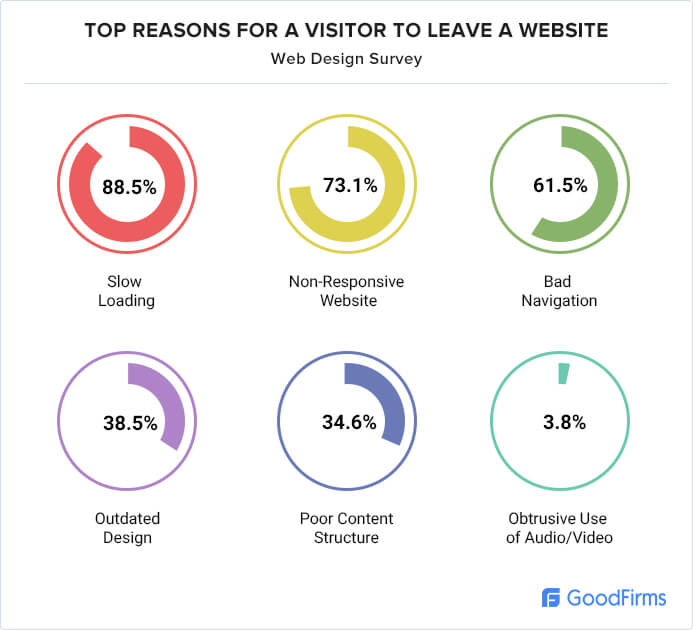
So, ensure the following considerations:
- Clear navigation and menu structure
- Simple product discovery and search
- Clean layouts
- Rich content
- Mobile-friendly and responsive design
- Consistent branding, colours, and fonts
Step 5: Ecommerce website development
This is the stage where your ecommerce website will be built based on the plans, designs, and technical setup that you have created in earlier steps.
The focus of this stage is to turn all the designs and features into a fully working online store. In this development process, the front end and back end of the website are created.
The front end includes everything customers see and interact with, such as product pages, speed, mobile and checkout screens. The front end has to be mobile-first, as mobile now brings the majority of transactions. In the US holiday season, 56.4% of online transactions happened on smartphones.
The backend deals with how products, orders, users, and data are managed. As per Core Web Vitals metrics, during backend development, the system has to be optimised so product pages load in under 2.5 seconds, and user actions like add-to-cart or checkout respond in under 200 milliseconds.
Key development tasks usually include:
- Building page layouts
- Developing product pages and category structures
- Setting up the shopping cart and checkout functionality
- Connecting databases for products and customer data
- Integrating required third-party tools and systems
Step 6: Product and inventory management setup
Once the ecommerce website is built, you need to set up products and inventory so that the store can operate smoothly.
Adding products to the website includes product names, descriptions, prices, images, variations such as size or colour, and category placement. If you provide clear and well-structured product information, it will help customers make confident buying decisions.
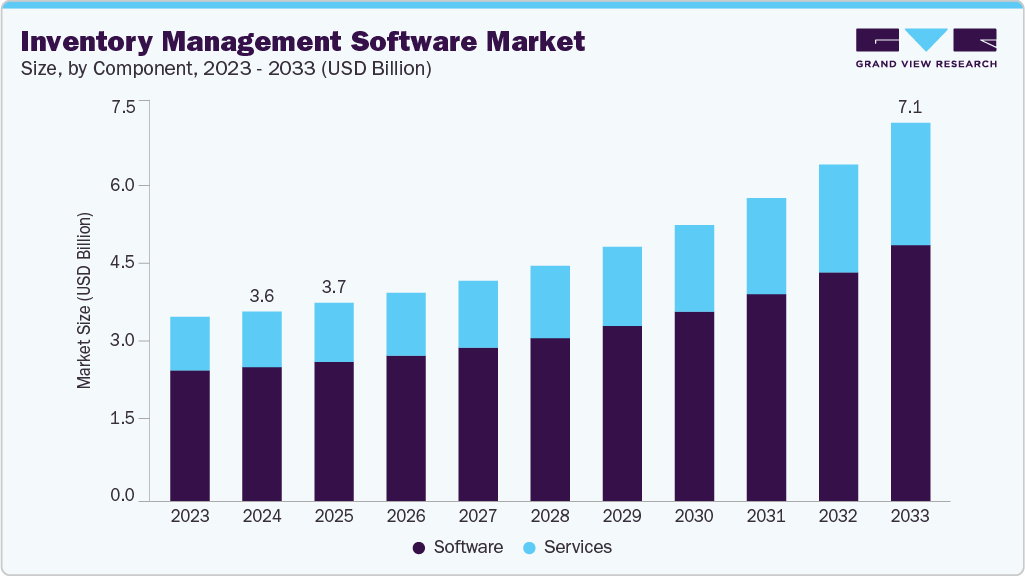
Inventory management is set up to track stock levels automatically. In fact, the global inventory management software market is expected to grow from about USD 3.58 billion in 2024 to USD 7.14 billion by 2033. It also reflects the rising demand from ecommerce and other sectors for tools that automate stock control and order processes.
Step 7: Payment gateway integration
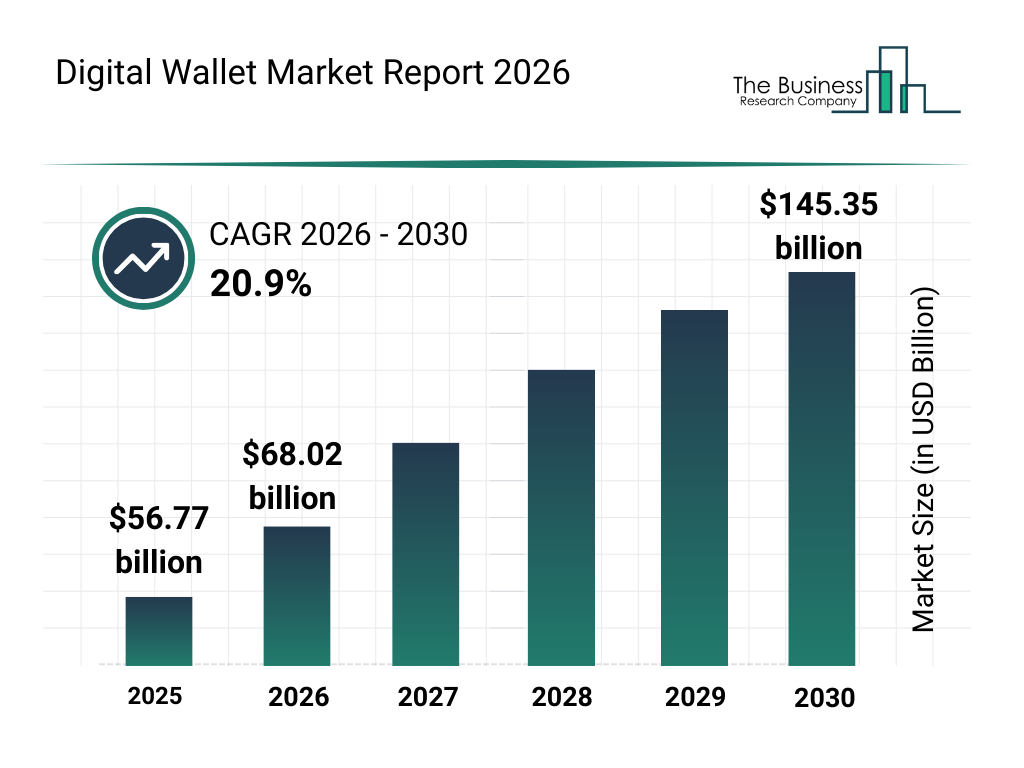
This step is not just about adding card payments; it involves offering the payment methods people actually use. Today, digital wallets are becoming the default checkout option. If we see the market size, it has reached to $56.77 billion in 2025 and is expected to grow to $145.35 billion in 2030.
Another key consideration is payment choice. Baymard’s checkout research shows that around 10% of shoppers abandon their purchase simply because there are not enough payment methods available. So, if your ecommerce website only supports one or two options, there is a high chance that it will effectively push some buyers to quit at checkout.
This is why modern payment integration usually includes:
- Credit and debit cards
- Digital wallets such as Apple Pay and Google Pay
- Buy now, pay later services
- Local and region-specific payment methods
Step 8: Shipping, tax and checkout configuration
Once payments are set up, you need to configure shipping, tax, and checkout rules in the next step. The orders have to be completed accurately and without confusion.
Shipping configuration defines how products are delivered to customers. This includes setting shipping zones, delivery methods, pricing rules, and estimated delivery times. Clear shipping costs and timelines help customers make decisions and reduce last-minute drop-offs at checkout.
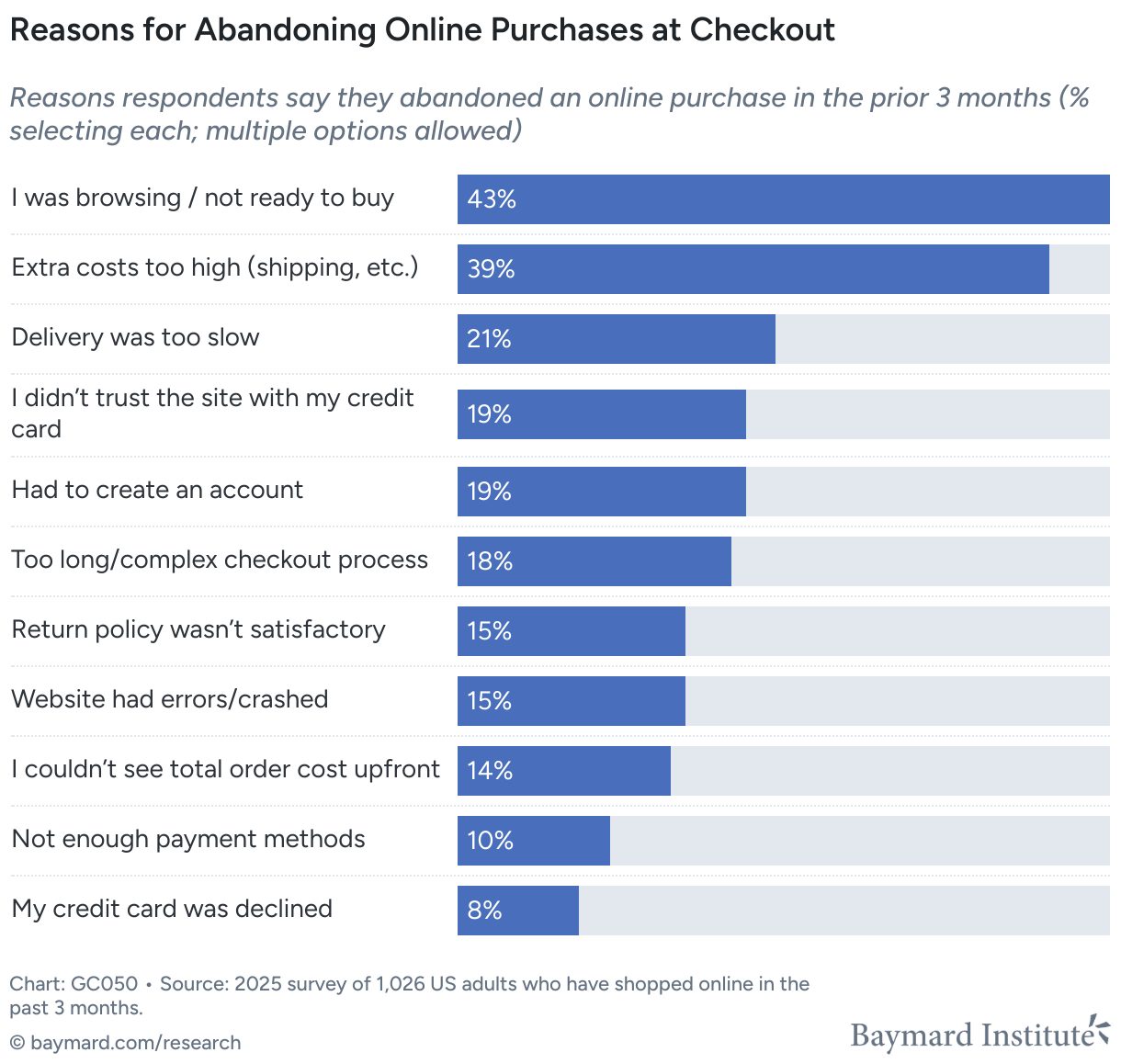
This research shows that many checkout problems are causing lost sales. Baymard Institute found that improving checkout usability alone could increase conversion rates by 35.26%.
Step 9: Ecommerce website security
At this stage, you need to implement the security features across the website and server. This can involve encrypting data, securing user accounts, or protecting the site from common attacks such as malware, hacking attempts, and data breaches.
Here are some key security measures,
- SSL certificates
- Secure payment processing and PCI compliance
- Strong password system and user authentication
- Firewalls protection
- Regular backups and security monitoring
Security is not a one-time setup. It requires ongoing updates, patches, and monitoring to keep the ecommerce website protected.
Step 10: Testing and quality assurance
Testing and quality assurance ensure your ecommerce website works exactly as intended before it goes live. You have to identify and fix issues that could affect usability, performance, or customer trust. Industry research also shows that fixing bugs before launch is significantly cheaper than resolving them after customers encounter problems.
Here are some testing activities you must include:
- Functional testing
- Cross-browser and cross-device testing
- Performance and speed testing
- Security and data handling checks
- Error handling and form validation testing
Step 11: Ecommerce website launch
This is the point where your online store goes live and becomes accessible to your customers. So, you have to focus on making everything ready for real users and real transactions.
Before launch, complete a final review to confirm that products, pricing, shipping, tax, and payment settings are correct. Use tracking tools to measure your performance from day one.
Most common pre-launch checks include:
- Verifying all product pages and categories
- Testing checkout and payment processing before launching
- Ensuring emails for orders, shipping, and confirmations are working
- Checking page speed and mobile responsiveness
- Confirming the activity of security and backup systems
When the website is live, monitor the launch closely. Track everything from orders to traffic to quickly identify and resolve any unexpected issues.
Step 12: Post-launch maintenance and optimisation
Your work is not done once you launch the website. You need to focus on post-launch maintenance and optimisation to keep the website secure and up to date.
You have to update the ecommerce platform, plugins, and integrations to ensure compatibility and security. If you do regular backups and run security monitoring, it will protect the website from data loss and emerging threats.
Key post-launch activities include:
- Monitoring website performance and uptime
- Detecting bugs and usability issues
- Optimising page speed and mobile experience
- Updating content, products, and pricing
- Boosting conversion rates through testing and refinement
How to choose the right ecommerce development option
Choosing the right ecommerce development approach is a technical decision as well as a business strategy choice. Whatever platform you pick, remember that it will affect your startup cost, speed to market, scalability, and long-term flexibility.
So, before you end up picking the “most popular” option, evaluate four practical factors first.
Consider your budget
It is your budget that determines how much customisation, automation, and performance optimisation you can do. Considering the industry data, if we take an approximate number
- Template-based ecommerce platforms typically cost $1,000–$10,000 to launch
- Fully custom ecommerce development often exceeds $50,000+
This is why many small and mid-sized businesses choose hosted platforms to reduce the upfront development costs by offering built-in hosting, templates, security, and checkout systems.
Key takeaway: If your business is aiming to launch fast without heavy upfront investment, all-in-one ecommerce platforms offer the most practical solution by combining hosting, security, payments, and essential tools in a single system.
Business size and growth goals
A company’s growth stage plays a major role when it comes to choosing the right ecommerce development approach. As businesses grow, the operational needs of a business become more complex. As a result, most of the largest retailers and franchise-style operations often require platforms that support:
- Multi-store and multi-location management
- Advanced inventory and warehouse control
- Integrated content management and ecommerce in one system
- Wholesale, B2B pricing, and bulk ordering features
Key takeaway: If your growth plan includes physical stores, wholesale channels, or multi-location selling, go for a scalable platform early. You can prevent any sort of costly migrations late on.
Customisation needs
Almost 90% of consumers say that they are influenced by ecommerce personalisation, and almost 90% of marketers say that ecommerce personalisation has boosted revenues. So you have to be sure about your store's requirements first. Whether you need
- Custom product builders
- Advanced filtering systems
- Loyalty programs
- Subscription billing
- Complex checkout logic
Then, platforms with flexible APIs and plugin ecosystems or custom development.
Key takeaway: The more unique your customer experience needs to be, the more flexibility your platform has to provide.
Available technical resources
In 2026, 55% of small businesses plan to increase spending on tech in the coming year. The rise in tech investment shows that technology has become essential for attracting new customers. Customer needs and expectations remain as the most influential factor when creating their 2026 tech budget.
As most small businesses struggle with limited technical skills, many companies prefer managed ecommerce platforms nowadays. Platforms often handle the technical workload by offering
- Server management
- Security patches
- Performance optimisation
- Payment compliance
- Automatic updates
Key takeaway: If you don’t have a technical team, choose a managed platform to lower your operational risk while saving time.
How WebCommander helps in ecommerce website development
WebCommander is designed as an all-in-one ecommerce and content management platform. It combines all from website management to ecommerce tools to business operations into a single system. So, instead of relying on multiple third-party plugins and integrations, WebCommander provides all the essential features that improve performance, stability, and long-term maintainability.
Faster store setup
WebCommander allows businesses to launch ecommerce websites quickly using built-in templates, design tools, and page builders. This ends up taking less development time while still allowing customisation of layouts, branding, and user experience.
Integrated CMS and ecommerce system
Unlike platforms that separate content management and ecommerce features, WebCommander combines both into one unified dashboard.
This makes it easier to manage:
- Product catalogs
- Website pages and blogs
- Promotional banners
- Landing pages
- SEO content
Advanced inventory and order management
WebCommander works best for growing businesses that handle high product volumes. It supports:
- Centralised product management
- Stock tracking and availability control
- Bulk product updates
- Order processing and fulfilment management
Multi-store and multi-location support
For businesses operating multiple stores or regional branches, WebCommander provides tools to manage multiple storefronts from one system. This includes centralised product data with location-specific pricing, inventory, and promotions.
Built-in SEO and performance optimisation tools
WebCommander includes SEO-friendly URL structures, metadata management, and performance optimisation features. These help ecommerce websites rank better in search engines and load faster for users.
Security and scalability
WebCommander provides enterprise-level security features and scalable infrastructure that can handle increasing traffic and transaction volumes. This makes it suitable for both mid-sized businesses and growing enterprises.
Future trends in ecommerce website development
- Most people are shopping online monthly.
- AI is about to help address customer pain points faster. Customers are increasingly comfortable interacting with AI assistants.
- The voice commerce market is growing faster.
- Social platforms are becoming major discovery and sales channels.
- As omnichannel shopping is growing, developers will increasingly adopt API-first approaches.
What truly sets a modern ecommerce website apart from others is the attention to detail. A small improvement in performance, usability, payments, and inventory accuracy can lead to meaningful gains in conversion, customer trust, and long-term revenue. Since the expectation of customers is continuously rising and the technology is evolving, build your ecommerce websites prioritising flexibility, scalability, and continuous optimisation in mind.
So, follow a structured development process, stay aligned with emerging trends, and create an ecommerce experience that does more than just sell products. Work on building loyalty and support sustainable growth to rise in this increasingly competitive market.


